Journal · Guide
Google Preferred Sources: How to Get Your Website Selected
What it is, why it matters, how to check your site, and exactly how to let readers choose you.
On this page ▾
- What is Google Preferred Sources?
- Why does Google Preferred Sources matter?
- Can your website become a Preferred Source?
- How to let readers select your website
- Where should you put the Preferred Sources link?
- Should you ask friends, family, clients, or subscribers?
- What happens after someone selects you?
- What Preferred Sources does — and does not — do
- Why keeping your site current still matters
- One more thing
Quick answer: Google Preferred Sources lets people choose websites they want to see more often in Google Search. If your site appears in the Preferred Sources tool, you can give readers a direct link or add Google's interactive button to your website. Their selection personalizes their own Google experience; Google has not said that accumulating selections creates a universal ranking boost.
Google now lets your readers choose your website as a source they want to see more often.
And you cannot choose yourself.
That is what makes Preferred Sources interesting. This is not a form you submit to Google, a schema setting, or a new ranking score. A reader makes the choice.
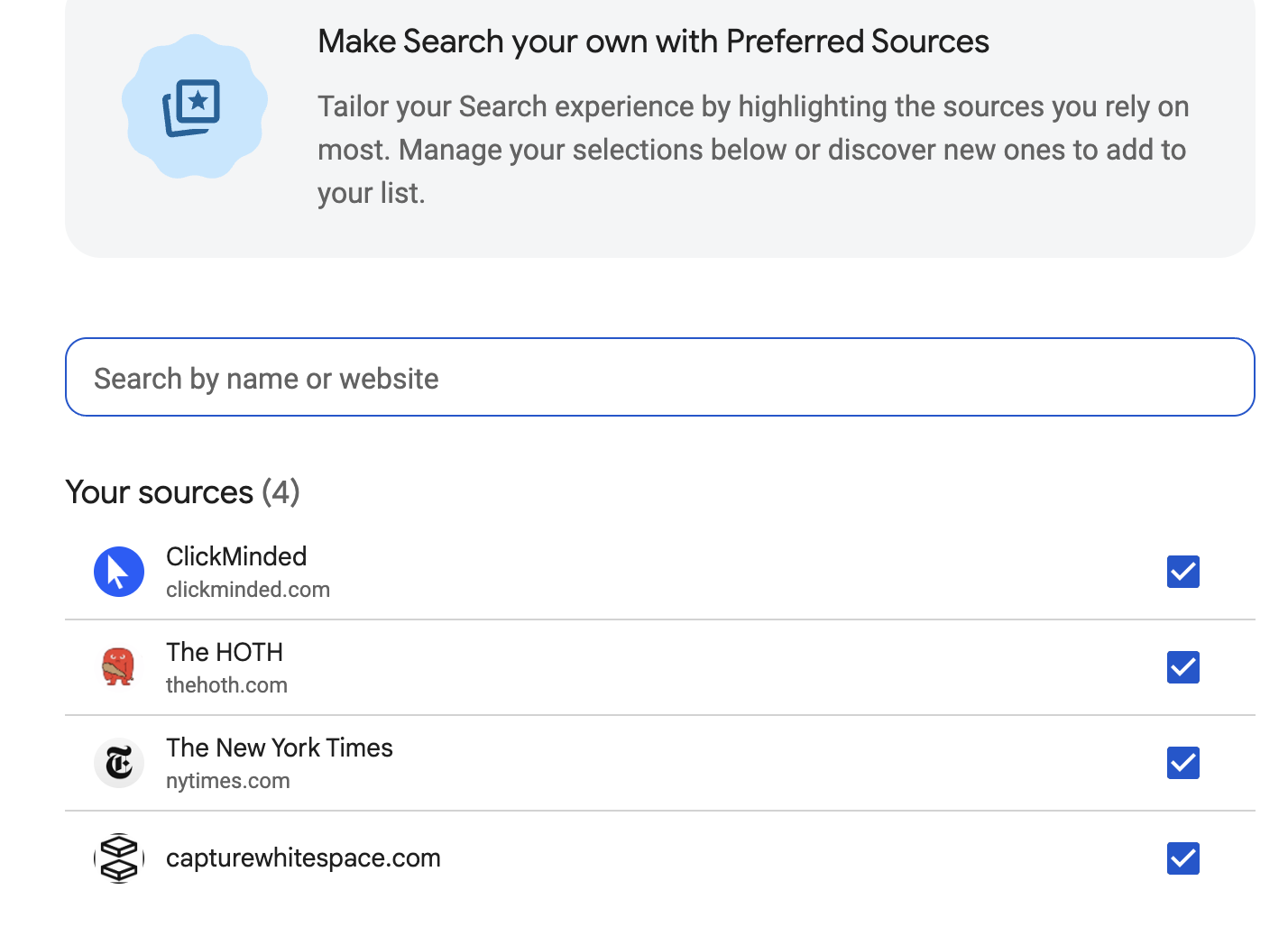
When I checked Google's Preferred Sources tool, Capture White Space was there — available to be selected alongside sites like The New York Times, ClickMinded, and The HOTH. That made the feature immediately practical for me. It was not something I was reading about in theory. My site was actually there.
What is Google Preferred Sources?
Preferred Sources is a Google Search feature that lets people choose the websites and publications they value most. Once a user selects a source, Google can show that source more prominently for that person in Top Stories. In AI Overviews and AI Mode, selected sources can also be highlighted with a "Preferred" badge.
The important word is personal. Preferred Sources is a personalization feature. It does not mean your site suddenly ranks higher for everyone.
Why does Google Preferred Sources matter?
Because your existing audience can actively influence what Google shows them from you.
A customer, reader, subscriber, colleague, friend, or family member who genuinely wants to see more of your work can select your site. Google then remembers that preference for that user.
That is different from trying to guess what Google wants. You are making it easy for people who already value your work to tell Google exactly that.
Google has also reported that readers are about twice as likely to click through to a site after marking it as a Preferred Source. That figure comes from Google's April 2026 Preferred Sources update.
Can your website become a Preferred Source?
The fastest way to find out is to check.
Check your site in about 30 seconds
- Open Google Preferred Sources at google.com/preferences/source.
- Search your business name or domain.
- If your site appears, it is available for users to select.
- If it does not appear, make sure you are searching the domain or subdomain — not a folder such as /blog.
Do not assume you know why a missing site is absent. Google specifically notes that sources that are not updated regularly may not be available, but it does not say that freshness is the only eligibility factor.
Google currently allows domains and subdomains, but not individual subdirectories.
| Address | Eligible |
|---|---|
| example.com | Yes |
| news.example.com | Yes |
| example.com/blog | No |
How to let readers select your website
If your site appears in the tool, Google gives publishers three practical implementation options.
Option 1: Use the direct link
The simplest method is a deeplink:
https://www.google.com/preferences/source?q=yourdomain.com
Replace yourdomain.com with your actual domain. You can use that link in your newsletter, article footer, website footer, resource page, email, or social posts.
Option 2: Add Google's interactive button
Google recommends its interactive JavaScript button because a reader can add the site as a Preferred Source and return to the page they were reading.
If you manage your own site, the standard implementation is only two lines:
<script async src="https://news.google.com/swg/js/v1/publisher.js"></script>
<div google-add-preferred-source-btn></div>
If someone else manages your website, send them those two lines or the Google Search Central documentation and ask them to add the Preferred Sources button where you want it to appear.
Option 3: Use your own button or design
You can also put the deeplink behind a button that matches your website. Google publishes an official badge for exactly this — the one at the end of this article is it.
Google also documents a more advanced JavaScript implementation for publishers that want complete control over the design and interaction.
Where should you put the Preferred Sources link?
You do not need a pop-up, takeover, or campaign. Put it where people who already value your content are likely to see it.
- At the end of a useful article
- In your newsletter footer
- On a resources page
- In your website footer
- In an occasional email to regular readers
A simple ask is enough:
"Find this useful? Add Capture White Space to your Google Preferred Sources."
Should you ask friends, family, clients, or subscribers?
Yes — if they genuinely want to see more from you.
Their selection helps personalize their own Google experience. Google has not said that collecting a large number of selections from friends, family, or anyone else creates a universal ranking advantage.
So I would not treat this as a "get 100 people to click this" tactic. Share it with the people who already read, follow, hire, refer, or value your work, and let them decide.
What happens after someone selects you?
For that user, Google can show your content more prominently in Top Stories when you have fresh, relevant content for the query. Selected sources can also be highlighted with a Preferred badge in AI Overviews and AI Mode.
The user can manage or change their Preferred Sources later. The preference is theirs, not yours.
What Preferred Sources does — and does not — do
| Preferred Sources does | Preferred Sources does not |
|---|---|
| Personalize what an individual Google user may see | Raise your rankings for everyone |
| Help selected sources appear more prominently in Top Stories | Make ChatGPT, Claude, or Perplexity prefer your site |
| Highlight selected sources with a Preferred badge in Google AI experiences | Guarantee inclusion in AI Overviews or AI Mode |
| Give existing readers a direct way to express a preference | Replace SEO, useful content, authority, or good information architecture |
Why keeping your site current still matters
Google says, "Sources that aren't updated regularly may not be available."
That sentence is worth paying attention to, but not overinterpreting. Google does not say that publishing more frequently automatically improves your Preferred Sources performance. It says an inactive source may not be available to choose.
I have also noticed something while working on Capture White Space. As I have rebuilt the site, added content, and updated existing pages, I have watched it appear in places where some much larger companies with very little current content do not.
That is an observation, not proof of causation. But it has made me much less interested in treating a website as something you launch once and leave alone.
A website should reflect what your business knows now, not only what it knew when the site launched three years ago. You do not need to become a media company. You do need to remain current enough to have something useful to say.
One more thing
If your website has not changed much since it launched, Preferred Sources may be the least interesting part of this story. Your site should give people — and the systems they use to find you — something current to work with.
That is part of how we think about websites at Capture White Space: useful, current, understandable, and built to keep improving rather than sitting still.
Find this useful? Add Capture White Space to your Google Preferred Sources.
And if you'd rather talk about your own site than read about ours: thirty minutes, on us.
Sources, checked September 2026:
Related Reading
Eight AI website builders, six checks: what leaves with you and what doesn't
Eight vibe-coded builders against six checks an owner can run. None passes all six on its own pages. The table says which thing each one is missing, so you know before it is your turn.
AEO vs SEO vs GEO: 7 Differences That Decide Who Gets Named
SEO competes for a position on a page of links. AEO competes for a mention inside a single answer. Seven differences decide which one you're winning.
AI Watermarks: When They Matter, When They Don't
Every image you make with the big AI tools now carries an invisible serial number. Here's when that matters for a business, and when it doesn't.